What's New in Squeezed: A Clearer Buyer Guide and the Car Finder
Buyer Guides now open with the answer, the research behind them is sharper, and paid guides show what a car costs to own. Here's everything we've added to Squeezed since September, including the new Car Finder.
 Mirko8 min read
On this page12 sections
Most of this fall's work went into the Buyer Guide itself. Guides now open with the answer, the research behind every finding is sharper, and paid guides show what a car costs to own each month. We also built the Car Finder, for when you don't know which car to look at yet. This is everything new in Squeezed since our fall update.
A Buyer Guide that's easier to read
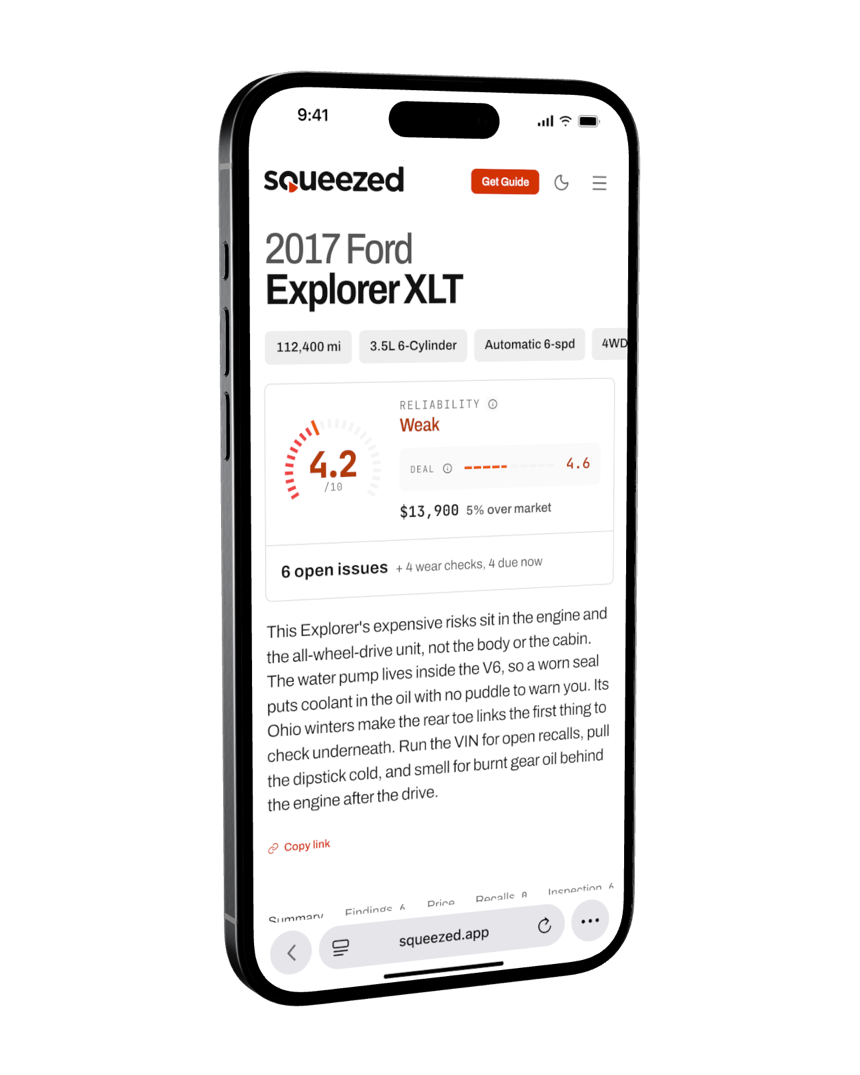
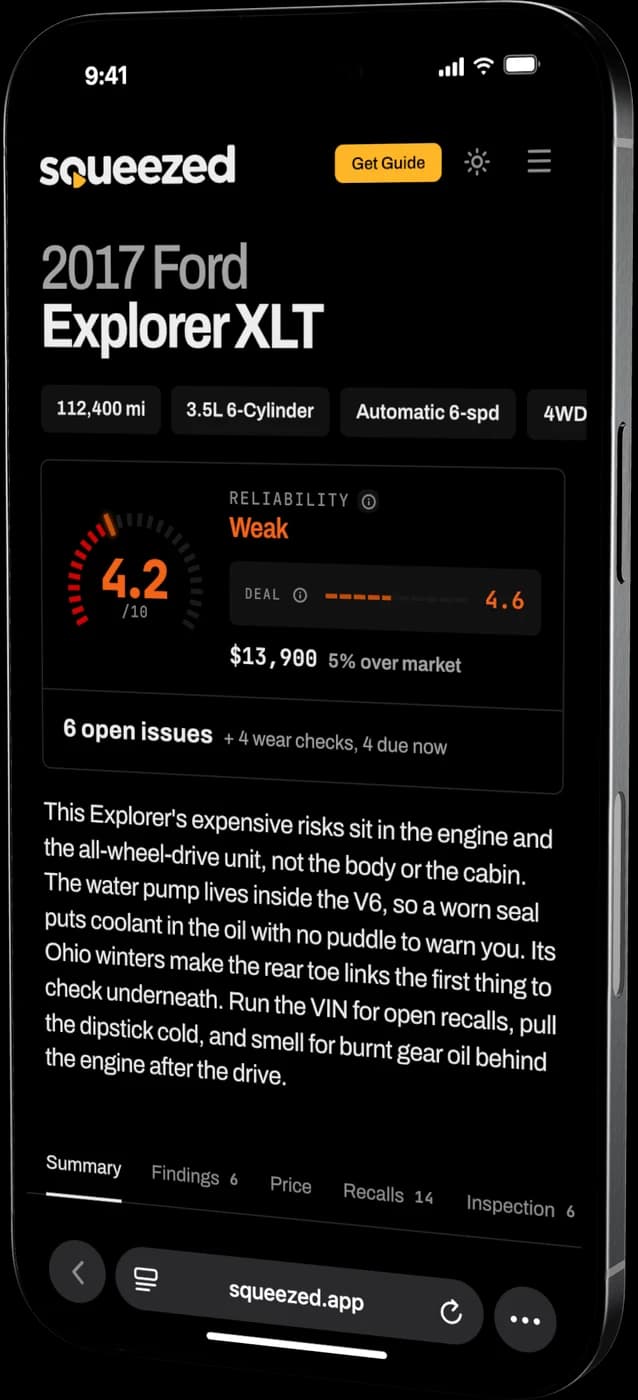
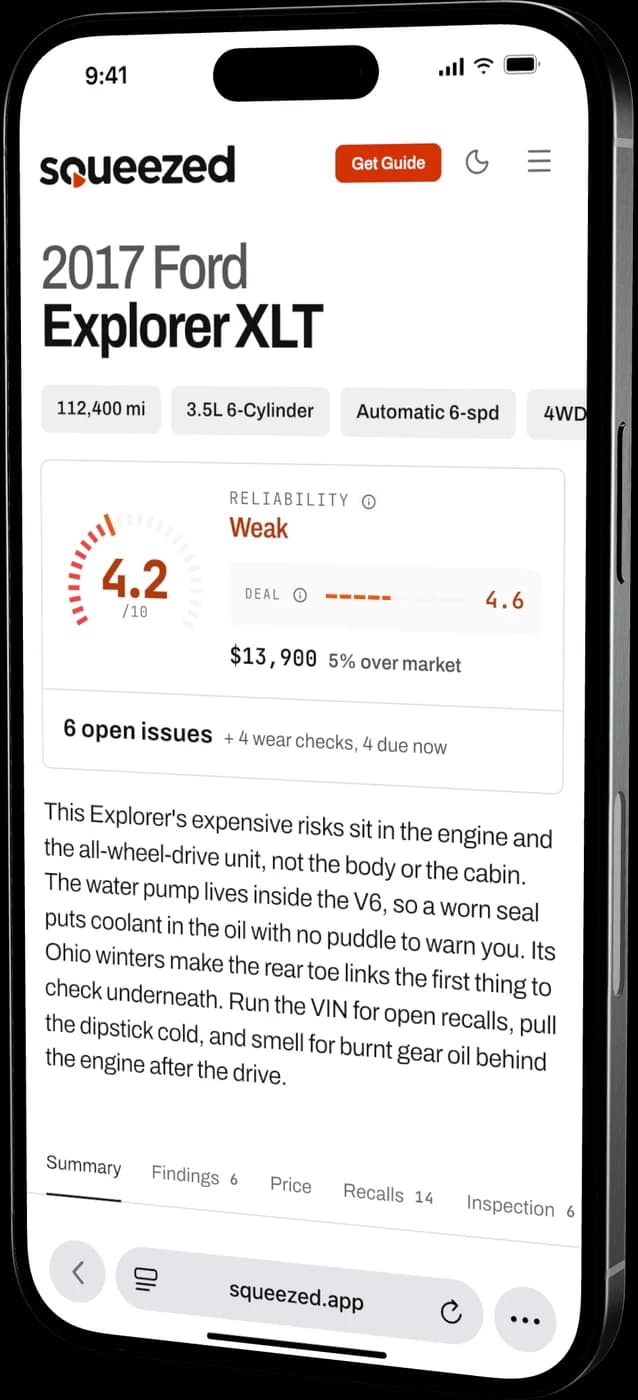
The guide now opens with the answer. The scorecard and the summary sit together at the top, so the first screen tells you where this car stands. On a phone the scorecard is compact and includes the asking price, and the tabs stay pinned as you scroll.
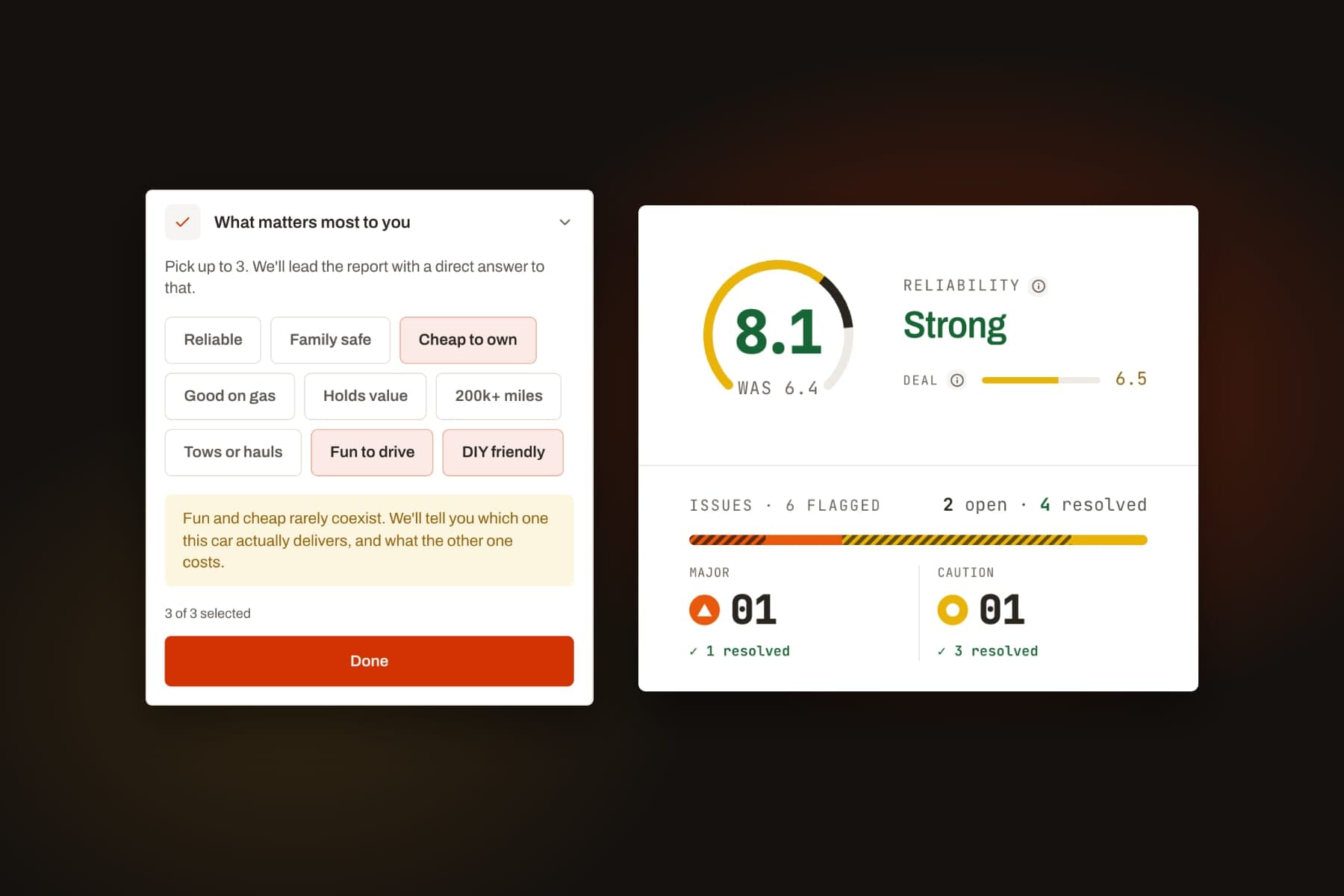
The Summary also has an At a glance profile: a chart of the car's strong and weak areas with a short list beside it, so you can tell at a glance whether the weak spot is the engine, the running costs or the price.
The first time you open a guide, you can take a short tour of the Summary and Findings. It's optional, and you can skip it.
If you want to see a full guide before you run your own, open the Sample Guide for a 2017 Ford Explorer.
Sharper research behind every guide
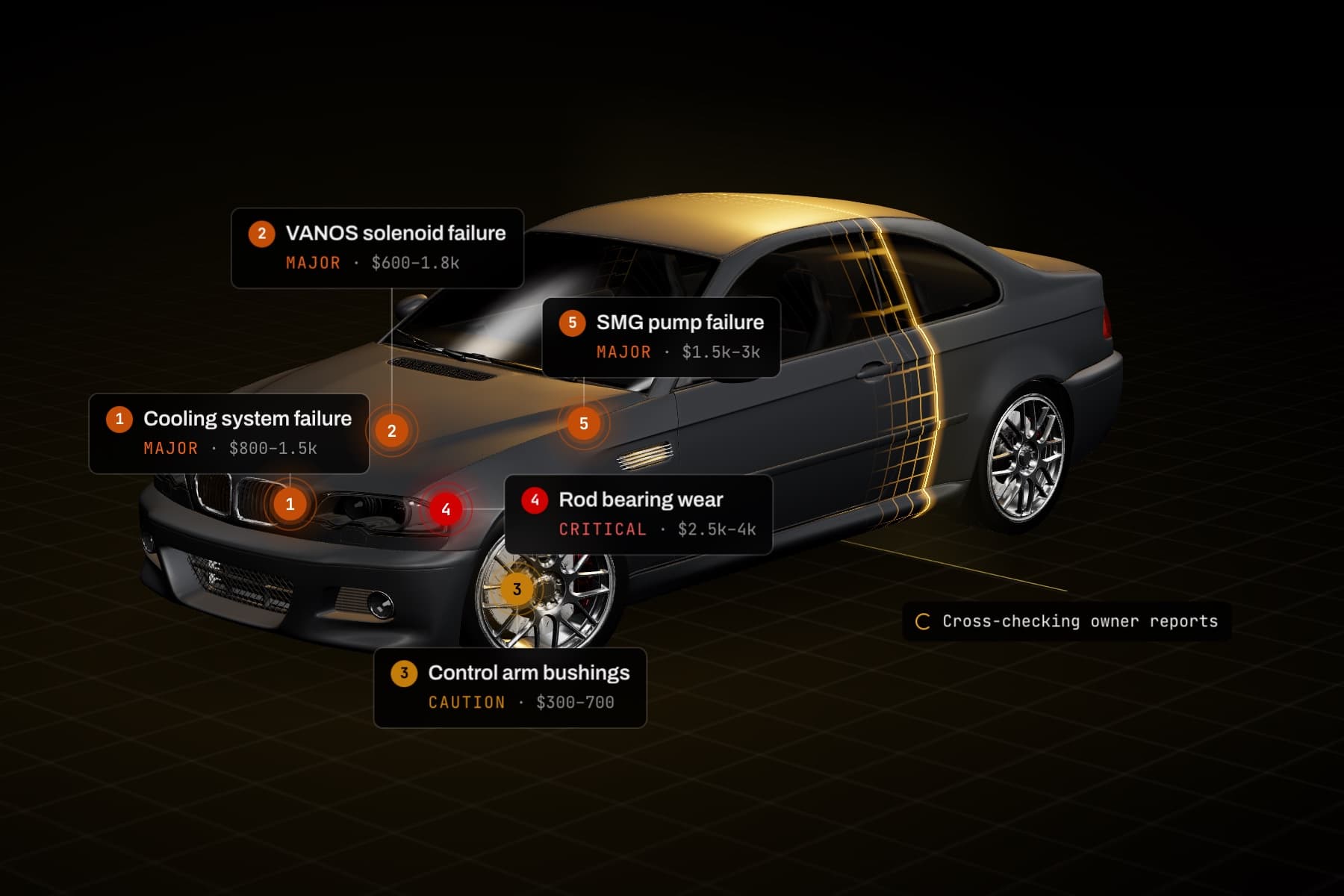
We spent a lot of this fall on the research behind each guide. You won't see most of that work, but you should notice the results: findings that are more specific to the exact car, severity that tracks what a failure would mean for you, and a reliability score that reflects the car in front of you. A few changes you will see:
A Wear and tear list. Some parts wear out on any car at a given age and mileage, like brakes, tires and bushings. Those now get their own list beside the findings. You'll know to check them, and they won't be confused with known problems for the model.
What the seller told you stays in. If you paste the listing or note a fault the seller mentioned, the guide keeps it and accounts for it.
The right car, before the research starts. The review step now shows a card with the exact car we're about to research. If the trim and engine you picked don't match, it asks which one you meant before you spend a credit. Partial VINs also work now, since many listings only show the last few characters.
Close the tab if you need to. Once a guide starts, it finishes even if you close the browser or lose signal, and it's waiting in your dashboard when you come back.
New on the Price tab: what the car costs to own
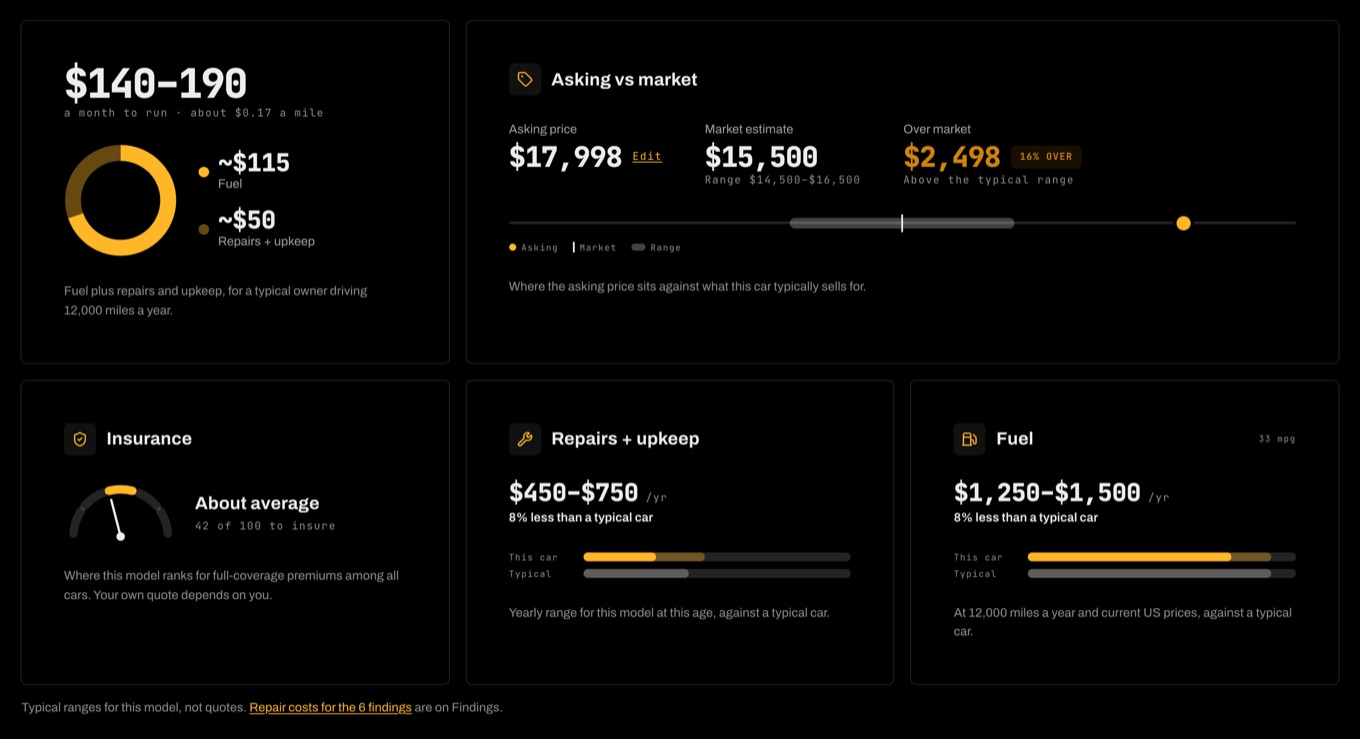
The price you pay is only the start. The Price tab now opens with what the car typically costs to run each month, so you can compare two cars on more than the sticker.
- A month to run. Fuel plus repairs and upkeep for a typical owner driving 12,000 miles a year, shown as a monthly range with the split between the two.
- Repairs and upkeep, and fuel. Each gets a yearly range for this model at this age, drawn against a typical car, with the car's combined mpg.
- Insurance. Where the model ranks for full-coverage premiums among all cars, from among the cheapest to among the priciest. Your own quote still depends on you.
- Asking vs market. The asking price against our market estimate and its range, with exactly how far over or under it sits.
These are typical ranges for the model, not quotes, and the repair costs for this car's own findings stay on the Findings tab. Cost to own is part of paid guides. On a free guide, asking vs market stays free, and you can unlock cost to own later for one paid credit.
Before you message the seller
Say goodbye to surprise repair bills.
Search the car you’re looking at. In about a minute: known failure patterns, repair cost exposure, questions to ask the seller and an overall risk rating.
Use it before you book an inspection
Car Finder: when you don't know which car yet
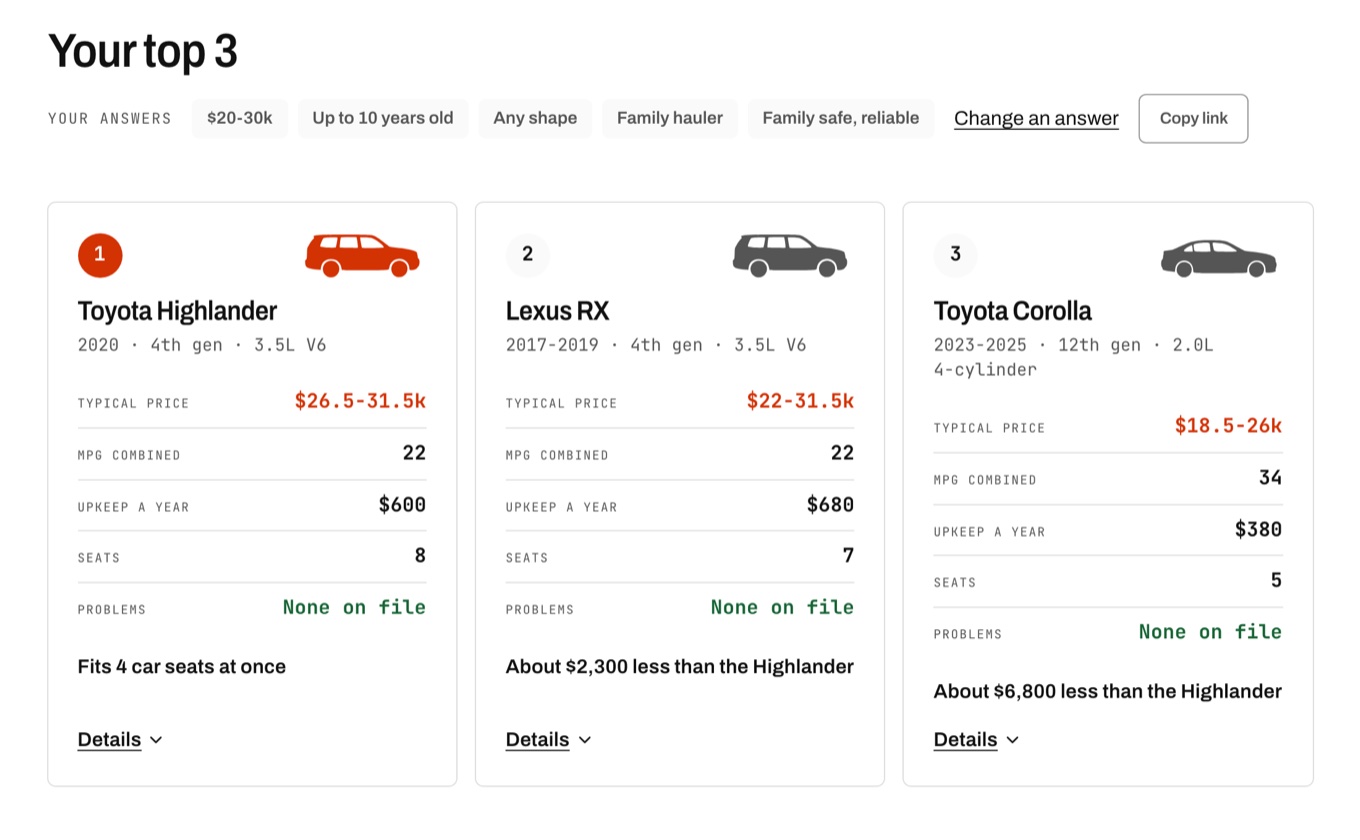
The Car Finder is a short quiz that turns what you need into three used cars worth shopping. It's free, and you don't need an account.
Most questions take one tap: what you'll use the car for, your budget, how old a car you'll consider, who rides with you, what you haul, and what matters most. Then you see your top 3 so far. Stop there, or sharpen the list with body style, fuel type and charging, must-haves, or the brands you like.
Each pick is specific. You get the generation, the model years to shop and which engine to look for, not just a model name. Your three picks sit side by side with price, fuel economy or range, upkeep, seats and known problems, and each one has its watch-outs with repair costs. You'll never get two generations of the same model in your top 3, so the list stays useful.
When you've picked one, a single tap starts a Buyer Guide with the car already filled in. You can also search real listings for it, email yourself the shortlist, or share the link with whoever's helping you decide.
The catalog covers about 410 models from 1990 to 2025.
Free research on every model, year and engine
You don't need an account to research a model. The cars pages now cover:
- Year pages with known problems and repair costs, recalls, and how that year compares with the years around it
- Generation pages that cover a whole generation in one place
- Engine pages with every known problem for an engine, across every car that used it
Recall lookups also cover more pickups, including the many NHTSA files by cab style.
When you've found a car on these pages, every page links straight to a Buyer Guide for that car.
Your first guide is free
Early access is over, and every new account gets its first Buyer Guide free. If someone gave you a promo code, redeem it on the redeem page. If you were halfway through setting up a car when you ran out of credits, you can pick up right where you stopped after redeeming.
For paid guides: photos from the walkaround
Paid guides add a camera to the in-person checklist. Snap a photo of anything you're unsure about as you go, and the guide reviews the photos together when you're done. It's new, and we'll keep improving it as people use it.
Every guide can also be downloaded as a PDF buyer summary, if you'd rather walk the car with paper in hand.
While you wait
A guide takes about a minute. While it runs you can play a short driving game, and now you can play it on its own too.
Smaller changes you'll notice
The site has a cleaner look, with true black in dark mode and white in light mode. Pricing hasn't changed: a single guide is $3.99, a 5-pack is $14.95 and a 10-pack is $19.90, all on the pricing page. The iPhone app is still in the works, and we'll post here when it's out.
In case you missed it
If you're new here, these arrived in the fall update and are in every guide:
- Buyer priorities. Pick up to three things you need from the car, like Reliable, Cheap to own or Tows or hauls, and the Summary opens with how this car fits them.
- Four answers per finding. Mark each finding Looks fine, Confirmed a problem, Couldn't check, or Doesn't apply, and the score updates to match what you found at the car.
- An in-person checklist on your phone. It saves your answers without signal and syncs when you're back in range.
- Recall data that admits its gaps. If NHTSA has no coverage for a model, the guide says so instead of showing zero recalls.
- Classic cars from 1965 to 1983, with questions about what's original, rebuilt or upgraded.
- Paid guides add a deeper research pass, photo inspection and a side-by-side compare.
New to Squeezed? Here's what every guide does
Enter the year, make, model and mileage of the car you're looking at, and in about a minute you get:
- Known failure patterns
- Repair cost exposure
- Questions to ask the seller
- Overall risk rating
Start with the Car Finder if you're still choosing, or run a Squeezed report on the car you're about to see. Run Squeezed first, then decide which car earns the pre-purchase inspection.
Findings reflect documented patterns for this year, make and model. Not a guarantee for any individual vehicle. Always get a professional pre-purchase inspection before committing to a purchase.
FAQ
Is the Car Finder free?
Yes. The Car Finder is free and you don't need an account. You answer a few one-tap questions and get your top 3 used cars, each with the years to shop, the engine to look for and its known problems.
Is Squeezed free to use?
Your first Buyer Guide is free on every new account. After that, a single guide is $3.99, a 5-pack is $14.95 and a 10-pack is $19.90. The Car Finder and the model, year and engine pages are free with no account.
What does Cost to own show?
On a paid Buyer Guide, the Price tab shows what the car typically costs to run each month (fuel plus repairs and upkeep at 12,000 miles a year), yearly ranges for repairs and fuel against a typical car, and where the model ranks for insurance. They are typical ranges, not quotes. On a free guide you can unlock it later for one paid credit.
What is the Wear and tear list in a Buyer Guide?
Parts that wear out on any car at that age and mileage, like brakes, tires and suspension bushings. They're listed beside the findings so you know to check them, but they don't count as known problems for the model.
Does Squeezed replace a pre-purchase inspection?
No. Squeezed researches what's documented for a car's year, make, model and mileage so you can decide which cars deserve a closer look. Always get a professional pre-purchase inspection on the car you plan to buy.